Send requests with the client certificate already in your Windows store
Some internal APIs don't take a password; they ask for a certificate. certapi picks yours from CurrentUser\My or LocalMachine\My and lets Windows sign the TLS handshake, so the private key never leaves the store and never has to be exportable. A .pfx or .pem file works too.
The seal of a certapi doctor run against https://client.badssl.com/, one ring per stage: url 5 ms, proxy 49 ms, dns 68 ms, tcp 36 ms, tls 397 ms, http 88 ms; TLS 1.2 with the client certificate presented; the server answered HTTP/1.1 200 OK.
The seal of a certapi doctor run against https://client.badssl.com/, one ring per stage: url 11 ms, proxy 66 ms, dns 55 ms, tcp 42 ms, tls 660 ms, http 90 ms; TLS 1.2 with no client certificate presented; the server answered HTTP/1.1 400 Bad Request.
certapi doctor run against client.badssl.com, a public test server that asks for a client certificate. One ring per stage, outside in, with the time each took. The certificate is BadSSL's published test one, passed with --cert-file; --cert "CN=…" takes yours from the store.
The same URL with no certificate. Every stage connects, the TLS handshake included, and the server answers 400 Bad Request: “No required SSL certificate was sent”.
Install in PowerShell. No installer, no admin rights.
mkdir "$env:LOCALAPPDATA\certapi" -Force; cd "$env:LOCALAPPDATA\certapi"curl.exe -LO https://github.com/Real-Fruit-Snacks/certapi/releases/latest/download/certapi.exe curl.exe -LO https://github.com/Real-Fruit-Snacks/certapi/releases/latest/download/ApiTester.App.exe certapi.exe is the command line and ApiTester.App.exe the desktop app, both from the latest release with the .NET runtime inside. Add the folder to your PATH; certapi update later replaces both, each checked against the SHA-256 GitHub publishes. With Scoop: scoop install https://github.com/
Some endpoints don't take a password
They ask the browser to choose a certificate and complete a mutual-TLS handshake. Most API clients want that certificate and its private key as files on disk, which enterprise and smart-card certificates deliberately don't allow. certapi uses the certificate where it already is, and the operating system does the signing.
The certificate is optional. With none selected certapi is an ordinary HTTP client, so the same collections, environments and assertions work against anything else too. I wrote it for my own internal APIs; it assumes Windows 10 or 11 and nothing else.
Which certificate does this server want?
certapi doctor connects one stage at a time and names the stage that broke. At the TLS stage it reads the authorities the server will accept client certificates from, and checks them against every certificate in your store. This is the run the seal draws, exactly as certapi printed it.
PS> certapi doctor https://client.badssl.com/ --cert-file badssl.com-client.p12 --cert-password badssl.com
certapi doctor · https://client.badssl.com/

  [ok  ] url      https://client.badssl.com:443/  (5 ms)
  [ok  ] proxy    DIRECT (system proxy says direct)  (49 ms)
  [ok  ] dns      client.badssl.com → 1 address  (68 ms)
           104.154.89.105
  [ok  ] tcp      connected to client.badssl.com:443  (36 ms)
  [ok  ] tls      handshake succeeded (Tls12)  (397 ms)
           protocol: Tls12
           cipher: TLS_ECDHE_RSA_WITH_AES_128_GCM_SHA256
           server certificate: CN=*.badssl.com (issued by CN=YR1, O=Let's Encrypt, C=US, expires 2026-12-28)
           chain (4 certificates):
             1. CN=*.badssl.com  F95E561C27728A1FF8461E7F6C89CB0225674E83
             2. CN=YR1, O=Let's Encrypt, C=US  CBCFD09CE3CD22D99D94E58F92E9898FBEE51A5E
             3. CN=Root YR, O=ISRG, C=US  AB9D0263244DD0326EB67015705A667E79CFE998
             4. CN=ISRG Root X1, O=Internet Security Research Group, C=US  CABD2A79A1076A31F21D253635CB039D4329A5E8
           client certificate presented: CN=BadSSL Client Certificate, O=BadSSL, L=San Francisco, S=California, C=US1
           the server accepts client certificates from 1 authority/authorities:2
             CN=BadSSL Client Root Certificate Authority, O=BadSSL, L=San Francisco, S=California, C=US
           NONE of your 5 certificate(s) are issued by any of those authorities3
           the certificate you chose IS issued by one of them
  [ok  ] http     HTTP/1.1 200 OK  (88 ms)

All stages passed in 643 ms.- The certificate certapi sent. Here it came from BadSSL's test file; with
--cert "CN=…"it is one from your store, and Windows signs with its key. - Read from the server's certificate request during the handshake: the issuers it will take a client certificate from.
- Every certificate in this machine's store, checked against that list. None of these five fit; the one passed on the command line does.
Without --cert-file, the same run reads client certificate presented: none and ends with HTTP/1.1 400 Bad Request. Run 5 November 2026 with certapi 1.96.1 on Windows 11.
certapi on the command line
The status line goes to stderr and the body to stdout, so a script can pipe one and read the other. Exit codes: 0 success, 1 failure, 2 usage, 3 data.
PS> certapi send https://client.badssl.com/
400 Bad Request · 262 B · 680 ms · TLS 1.2
<title>400 No required SSL certificate was sent</title> …

PS> certapi send https://client.badssl.com/ --cert-file badssl.com-client.p12 --cert-password badssl.com
200 OK · 687 B · 777 ms · TLS 1.2 · client cert presented
Both against BadSSL's public test server, the body cut to its title.
# one request, certificate from the store
certapi send https://internal.corp/api/orders --cert "CN=matt"
# log in, capture the token, reuse it
certapi send https://internal.corp/auth --capture token=access_token --workspace team.json
# a collection as a pass/fail suite (exit 1 on any failure)
certapi run "internal api" --env Prod --json
# the bytes, as framed and as received
certapi send https://internal.corp/api/orders --wire
# gRPC behind mutual TLS
certapi grpc call api.internal:5001 my.pkg.Greeter/SayHello -d '{"name":"Ada"}'
# stream, bench, mock, MCP
certapi sse https://internal.corp/events --max-events 5
certapi bench https://api.internal/health -n 500 -c 20
certapi mock --har session.har --port 8770
certapi mcp --cert "CN=matt" --allow internal.corp
Hosts here are examples. certapi <command> --help lists every flag, curl habits like -k, -i and send -d @file work, and a mistyped flag names the one you meant. The CLI reference has them on one page.
For an app that can't present a certificate
certapi serve is a local gateway that adds your certificate on the way out. Point the app at the port. It fronts one site or many: named sites, a certificate and settings per site, one origin each with --vhost, logins across hosts with --browser, a whole gateway kept in a profile. --check prints the table without binding anything. Requests to hosts you didn't allow are refused.
PS> certapi serve --port 8819 --cert-file badssl.com-client.p12 --cert-password badssl.com --upstream badssl=https://client.badssl.com
listening on http://127.0.0.1:8819/
  SITE    OPEN                           UPSTREAM                   CERT                       SETTINGS
  badssl  http://127.0.0.1:8819/badssl/  https://client.badssl.com  BadSSL Client Certificate  -
  every site: cert BadSSL Client Certificate · no token · loopback only
GET    /badssl/  -> 200  4787 ms

PS> curl.exe -s -o NUL -w "%{http_code} %{size_download} B" http://127.0.0.1:8819/badssl/
200 687 B
One engine, two front ends
The desktop app and certapi share one engine, one request model and one workspace on disk, so a request built in the window runs from a script.
- Certificates and networks
- The Windows certificate store (your Personal store or the machine's), picked by subject, issuer or serial, or a
.pfx/.pemfile; a smart-card PIN supplied ahead for headless jobs. Server pins by leaf, issuer or key; a private root from a file with--ca-file; revocation checking. System proxy, PAC, SOCKS, bypass lists,--offline. - Requests
- Tabs, collections, environments with
{{variables}}, response captures, request chains, assertions, data-driven runs from CSV/JSON, response diffing against a baseline. Import cURL, Postman, OpenAPI, HAR; export OpenAPI, HAR, markdown notes. - Diagnostics
doctorconnects one stage at a time and names the one that broke, including the CAs the server accepts client certificates from, matched against yours.--trace,--wireand--framesshow what the stack did, down to the plaintext bytes. No driver, no admin.- Gateway and mock
serveadds your certificate for apps that can't.mockis a standing test server over HTTP, HTTPS or mTLS, or a replay of a captured HAR.- Auth
- Bearer, Basic, OAuth 2.0 (client credentials, password, refresh, auth-code with PKCE, device code), Windows Integrated (Kerberos/NTLM), browser session capture, and automatic token reuse per host. Secrets are DPAPI-encrypted at rest.
- Automation
runturns a collection into a pass/fail suite with exit codes for CI.benchreports p50/p90/p99 latency over a pooled connection.grpccalls services via reflection or a descriptor set.mcpexposes all of it to an AI agent behind a host allowlist.
The desktop app
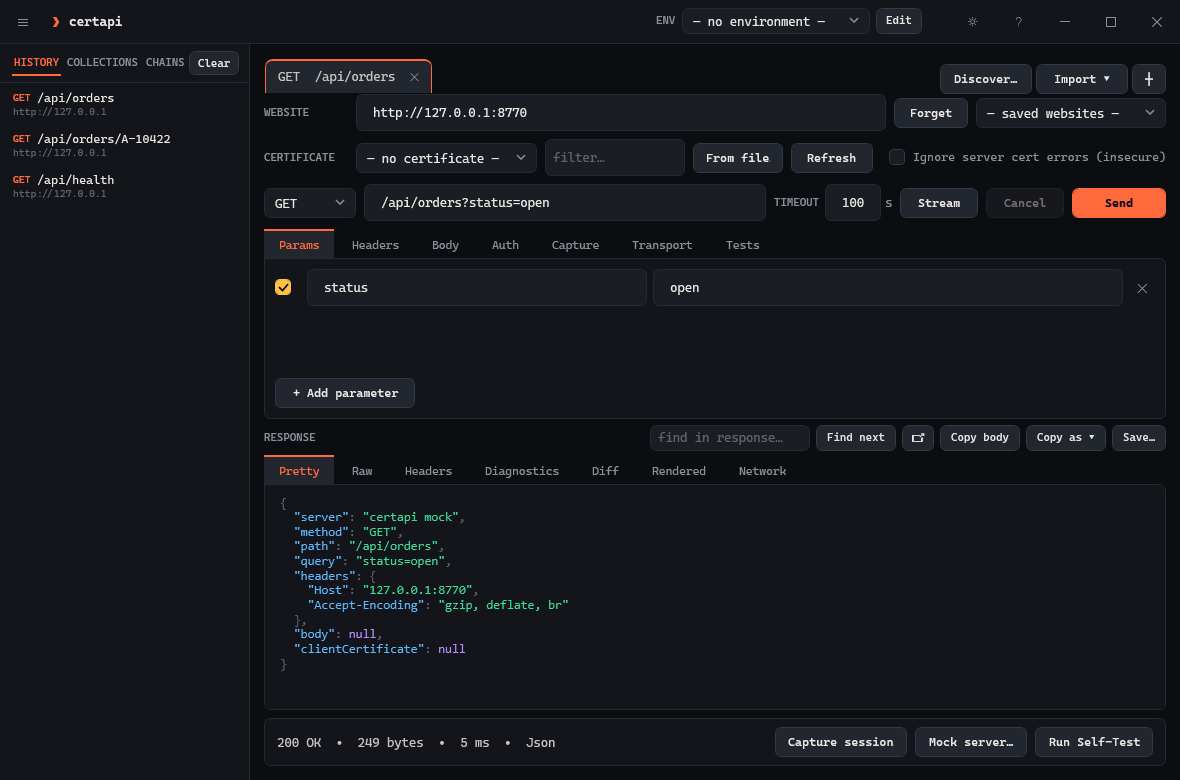
certapi mock.Tested on
- Windows 11 23H2 · .NET 9 SDK 9.0.320 or later
- Windows Server 2022 · headless
certapionly - GitHub Actions
windows-lateston every push: build with warnings as errors, then the test suite - Not tested: Windows 10 before 22H2, ARM64 Windows. Probably works, no promises.
Known issues
- The Rendered view needs the Edge WebView2 runtime. Windows 11 ships it; without it that tab says so and the rest works.
certapi servedoes not proxy gRPC.--protosetneeds a descriptor set you already have; certapi does not compile.protofiles.--http3is Windows 11 / Server 2022 and direct connections only.- Through a proxy, TLS version, cipher and certificate-presented details are not visible;
--no-proxybrings them back. - Over the plaintext gateway,
__Host-/__Secure-cookies cannot work;serve --tlsis the fix. serve --rewrite-bodyreaches URLs written into a page, not ones a script assembles at run time;--vhostneeds no rewriting at all.- A proxy that itself requires a client certificate is not supported.
--pacand--cert-pinare Windows-only;--sniworks on direct connections only.
The full list is in the README.
Shortcuts in the app
| Ctrl+Enter | Send the request |
| Esc | Cancel a request in flight |
| Ctrl+L | Focus the URL box |
| Ctrl+S | Save the response |
| Ctrl+T / Ctrl+W | New tab / close tab |
| Ctrl+H | Show or hide the sidebar |
| F5 | Refresh the certificate list |
| F1 | Help and reference |